MacUno reads your MacBook's lid angle and blurs, narrows, and dims your desktop in real time as you close it — then restores it as you open. Inspired by Apple's Duo concept.
Requires Apple Silicon MacBook on macOS 15.2+
No shortcut, no click — just the lid.
One purchase, the full feature set, no upsells later. Try the options below.
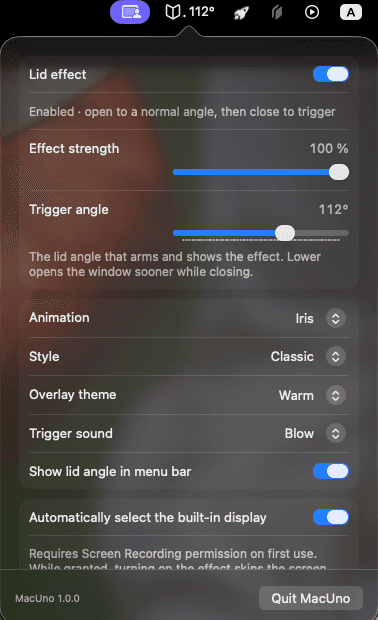
Trigger angle, animation variant, transition style, overlay theme, trigger sound, and the live lid-angle menu bar readout — all in one Settings popover, no separate unlock screen or in-app purchase after checkout.
One-time payment. No account, no subscription, no license key.
Similar menu bar utilities charge $5+ for a fraction of this feature set — MacUno packs custom triggers, extra transitions, multi-monitor, and more into one $4.50 purchase.
One-time purchase · more features, lower price
Secure checkout by Polar, powered by Stripe. You'll be redirected to download immediately after payment.
One payment, instant download — no free trial, no license key to lose.
Get MacUno · $4.50Apple Silicon · macOS 15.2+ · Screen recording permission required
First launch: macOS will block it once
No Open Anyway button? Paste this into Terminal, then open MacUno again:
xattr -dr com.apple.quarantine /Applications/MacUno.appMacUno is ad-hoc signed, not notarized, so macOS cannot verify it automatically. You approve it once, explicitly.
MacUno is a macOS menu bar app that turns your MacBook's lid angle into a live desktop transition. As you close the lid, MacUno reads the built-in lid-angle sensor and gradually blurs, narrows the perspective of, and dims an in-memory snapshot of your desktop — then restores it as you open the lid again. It's inspired by Apple's Duo folding-screen concept animation.
The effect is built natively in Swift, AppKit, SwiftUI, ScreenCaptureKit, Core Image, and Metal, with no third-party runtime dependencies. It uses an overlay rather than controlling the lock screen, and stops immediately when you press Esc or disable it in the menu bar popover.
MacUno is a one-time $4.50 purchase: a custom trigger angle instead of a fixed default, per-app strength profiles, extra transition styles like film grain and glitch, multi-monitor support, a live lid-angle HUD, and a themeable overlay — all included, no upsells later.
Nothing MacUno captures ever leaves your Mac. Desktop images exist only in local memory for the duration of the transition; the app doesn't save screenshots or video, upload images, or capture system audio or microphone input.